Prodigy Control for Q-SYS is in beta. These pages describe the current beta builds, which are pre-release software: what they say may change before the first production release, and parts marked Beta are new or still being tested. Downloading the beta needs an account with Prodigy Control for Q-SYS beta access (ask for it here). Tell us if something here is wrong.
Each input and output block you set up in Properties has its own tab, named after the block and its port, such as In 1 - NET 1 or Out 2 - MADI 1.
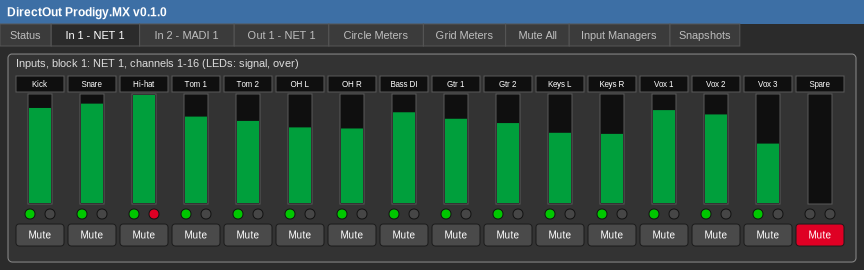
Each channel
Channels are laid out 16 to a row. Top to bottom, each one has:
- the unit's name for the channel (its default name when the unit has none);
- a meter in dBFS, from −100 to 0, showing the highest level since the last screen update;
- a signal LED (left), lit at or above the Signal Threshold, and an over LED (right), lit at or above the Over Threshold or at full scale and held for 1 s;
- a mute button.
The box title says which channels the block really covers. A channel the unit doesn't have shows -, and its controls are disabled. Channel Meters and Channel Mutes in Properties turn the meters and the mute buttons off.
Mutes
A pressed mute stays as you set it while the unit is asked. It is kept when the unit confirms it, and goes back to the unit's own state if the unit refuses it, doesn't answer within 5 s, or the link is down. Mutes changed elsewhere (on the unit or in Globcon) show up when the unit reports them.
Generators (sine, white noise and pink noise) have no mute of their own on the unit; their mute buttons switch the generator off and on, as Globcon does. BLDS, the reserved input, the test inputs and the Prodigy.MP's Dirac input have no mute, so their buttons are disabled.
Meters
Meters open after the unit has been read, on TCP port 5002, at the Meter Rate. They read the unit's meter frames for every model, including the older, smaller frames of firmware v0.0 to v0.2 and v1.0 to v1.2. If no meter data arrives for 5 s, the plug-in closes the meter connection and opens it again 2 s later. When the meter link is down, the meters and LEDs go down too.