Prodigy Control for Q-SYS is in beta. These pages describe the current beta builds, which are pre-release software: what they say may change before the first production release, and parts marked Beta are new or still being tested. Downloading the beta needs an account with Prodigy Control for Q-SYS beta access (ask for it here). Tell us if something here is wrong.
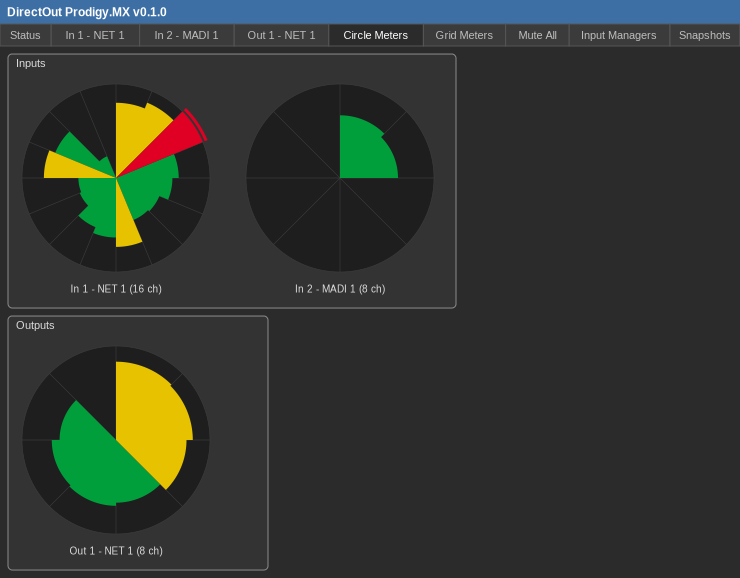
Turn on Circle Meters in Properties to add a Circle Meters tab. It shows a circle for each channel block: inputs on top, outputs below, four to a row.
Reading a circle
- Each channel of the block is a wedge, in channel order, clockwise from 12 o'clock.
- A wedge grows out from the centre with the channel's level: −60 dBFS at the centre, 0 dBFS at the rim.
- It is green, yellow from −18 dBFS, and red from the Over Threshold.
- A red mark on the rim shows while the channel's over LED is lit.
The label under each circle names the block and its channel count, for example In 1 - NET 1 (16 ch). Pressing a circle does nothing.
How they are drawn
Each circle is an image the plug-in draws on a button whenever new meter data arrives. With many large blocks, the plug-in spreads the drawing over several screen updates so it stays inside Q-SYS's limit on Lua work per call; circles then update a little less often than the bar meters.
Circle meters have been checked in Designer emulation only. On a Q-SYS Core with touch panels, each update sends the image to the panels (about 100 bytes per channel); how that behaves with many circles has not been measured. Keep blocks and the Meter Rate modest.