Prodigy Control for Q-SYS is in beta. These pages describe the current beta builds, which are pre-release software: what they say may change before the first production release, and parts marked Beta are new or still being tested. Downloading the beta needs an account with Prodigy Control for Q-SYS beta access (ask for it here). Tell us if something here is wrong.
The first tab of the control panel shows whether the plug-in is connected, which unit it is talking to, and the unit's clock and health.
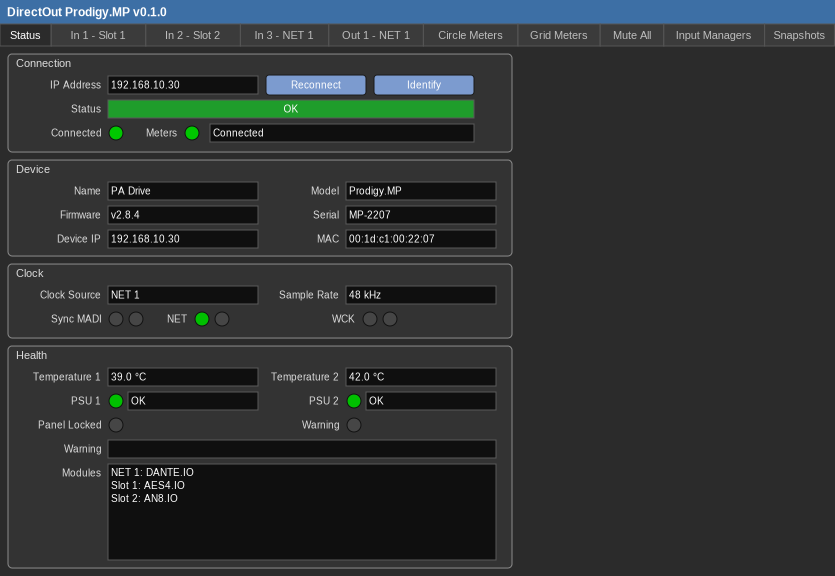
Connection
- IP Address: the unit's address. Used when the IP Address property is empty; changing it connects to the new address.
- Reconnect connects again at once. Identify asks the unit to flash its front panel.
- Status: the plug-in's overall status, as a Q-SYS status: OK (green) when connected with nothing to report, Compromised when connected with a warning, Fault when it can't reach the unit or has no IP address, Not Present when stopped, and Initializing while it connects and reads the unit. The messages are listed in Troubleshooting. To use it in a Status Combiner, add the Status output pin to the block (Controls and pins) and wire it to one of the combiner's inputs.
- Connected lights once the unit has been read and the link is up. Meters lights while the meter stream is open.
- The text box beside them shows
Connecting...,Reading device...,Connected, or the countdown to the next try, such asRetry in 8 s.
Device
Name, Model, Firmware, Serial, Device IP and MAC, as the unit reports them. Model shows the model the plug-in is using: the Model property's choice, or with Auto the model it detected.
Clock
Clock Source and Sample Rate, then a sync LED for each MADI port, each NET port the model has, and each word clock input: green when the unit reports sync, amber when it reports lock only, off with no lock.
Health
- Temperature 1 and Temperature 2, in °C.
- PSU 1 and PSU 2: the unit's state for each power supply (OK, ERROR, NOT STABLE or OFF). The LED is green for OK and red for ERROR or NOT STABLE.
- Panel Locked lights when the unit's front panel is locked.
- Warning lights, and the box below it shows the text, when the unit reports a warning.
- Modules: one line per fitted module, for example
Slot 1: AES4.IO.
A unit warning, a PSU error or an unstable PSU also set Status to compromised, with the reason as its text.