Prodigy Control for Q-SYS is in beta. These pages describe the current beta builds, which are pre-release software: what they say may change before the first production release, and parts marked Beta are new or still being tested. Downloading the beta needs an account with Prodigy Control for Q-SYS beta access (ask for it here). Tell us if something here is wrong.
An Input Manager (input router) picks one of up to six sources by priority and signal. This tab lets you override that choice and shows what the unit is doing.
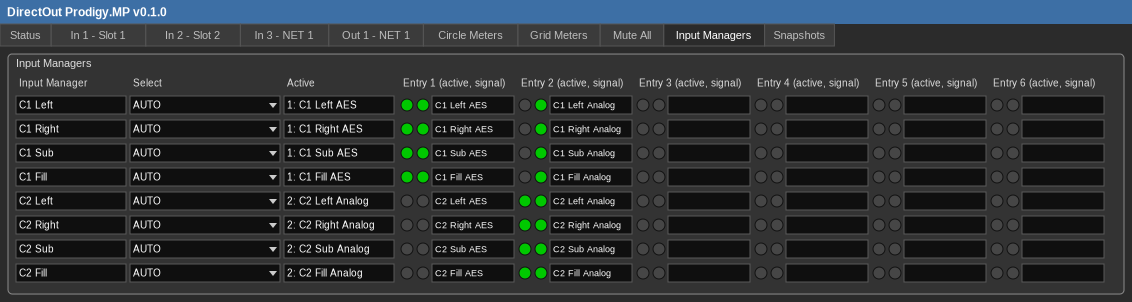
Each manager
- Input Manager: the unit's label for it, or
IM 3when it has none. - Select:
AUTO, or one entry by hand. Each entry that has a source is listed with its number and the source's name, for example2: C1 Left Analog. ChoosingAUTOhands the choice back to the unit. - Active: the entry the unit is using now.
- Per entry, 1 to 6: an active LED, a signal LED (lit when the unit reports the entry is not silent) and the source's name.
A new choice stays as you set it while the unit is asked, and goes back to the unit's choice if the unit refuses or doesn't answer within 5 s.
Which managers are shown
Input Managers and First Input Manager in Properties choose them: by default managers 1 to 4. The Prodigy.MC and MP have 32, the MX 64. With a fixed Model, rows stop at that model's last manager; with Auto, rows past the connected unit's last manager show - and are disabled.
Stereo-linked managers
When a manager is stereo-linked, a choice made by hand is also sent to its partner, as Globcon does. Whether the unit would do this by itself is not known yet.